
Answer your visitors the moment they ask
Layvchat is a live chat window you add to your site with one line of code, plus a console where your team handles every conversation. Unlimited chats; you pay only per agent.
- 14 days of Pro, free
- No credit card required
- No chat limits
Every conversation in one console
Waiting, assigned and resolved chats each have their own list. While you chat, you see which page the visitor is on and their earlier conversations.
See who's on your site
The live visitor list shows the page each visitor is on and where they came from. Invite anyone to chat, or automatically invite people who linger on a specific page.
- Real-time visitor list
- Manual and automatic chat invitations
- Pre-chat form for name and email
Stay organized as your team grows
Departments route chats to the right team. Supervisors watch the waiting queue and agent load live, and join a chat when needed. Reports show response times and satisfaction.
- Departments and routing rules
- Concurrent chat limit per agent
- Business hours and offline messages
Fits your brand and your systems
Change the window's colors, texts and position from the console. Identify your members with a signed identity, send chat events to your own systems with webhooks, and access your data through the REST API.
- Appearance settings with live preview
- Signed visitor identity and a WordPress plugin
- Webhooks and REST API
Everything the daily work needs
Most of this is included even in the smallest plan.
Widget in 7 languages
The window opens in the visitor's language; Arabic is shown right to left.
Canned responses
Insert categorized replies with a shortcut.
File sharing
Share images and documents; uploaded files are scanned for viruses.
Ratings
A rating and short survey at the end of each chat, with results in reports.
Reports
Chat volume, response times and satisfaction; download as CSV.
Telegram notifications
New and missed chats land in your team's Telegram channel.
Smart reply suggestions
Suggestions learned from your past chats; your data never leaves the service.
Security
Two-step verification, agent IP restrictions and an activity log.
Personal data tools
Export or delete visitor data, and set your own retention period.
Set up in five minutes
No developer needed. Add the code once; appearance and text changes are made from the console.
- Create your accountSign up with your email or your Google account.
- Add the code to your sitePaste the one-line snippet before the </body> tag, or install the WordPress plugin.
- Start chattingKeep the console open; you'll hear a sound when a new chat arrives.
<script src="https://app.layvchat.com/cd/w.js?k=YOUR_WIDGET_KEY" async></script>Answer chats from your phone
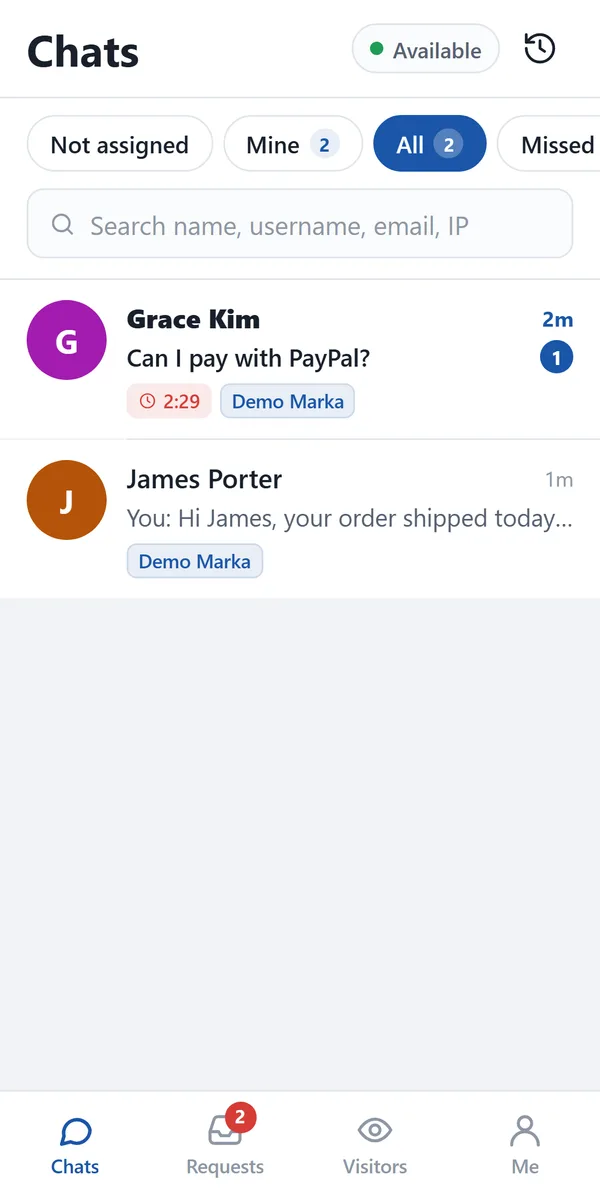
With the Android app, new chat notifications reach your phone and you can reply without being at your desk. Your account, chats and canned responses are the same as in the console.
The iPhone version is in the works.
How to install
- Open this page on your phone and tap “Download the APK”. If the browser warns you, choose “Download anyway”.
- When the download finishes, open layvchat.apk from the notification or from Files › Downloads.
- If your phone asks for permission, tap “Settings”, turn on “Allow from this source” for your browser, then go back.
- Tap “Install”. If Google Play Protect shows a warning, choose “More details” › “Install anyway”.
- Open Layvchat, sign in with your console email and password, and allow notifications.
Only download the app from layvchat.com. Small updates arrive inside the app automatically; when a new version is required, the app shows you the download link.
No chat limits. Pay per agent.
Every plan includes unlimited chats and all core features. New accounts get the Pro plan free for 14 days.
Solo
For one-person support.
- Core features:
- Unlimited chats
- Canned responses
- File sharing
- Live visitor tracking
- Business hours and offline messages
- Ratings and surveys
- Reports
- Telegram notifications
- Two-step verification
Team
For growing support teams.
- Everything in Solo, plus:
- Departments and routing
- Automatic invitation triggers
- Supervisor role and live dashboard
- Report export (CSV)
- Agent IP restriction
Pro14 days free
For teams connecting their own systems.
- Everything in Team, plus:
- Webhook notifications
- REST API
- Site integration and customer card
- Smart reply suggestions
- No "Powered by Layvchat" label
- Custom CSS
Enterprise
For custom needs and contracted service.
- Everything in Pro, plus:
- Your own domain soon
Prices are in US dollars, billed monthly.
Frequently asked questions
Can't find the answer you're looking for? Our team replies in the chat window within minutes.
Chat with usIs there really no limit on chats?
None. No plan limits the number of chats, visitors or messages. Plans differ only by the number of agents and extra features.
What happens when the trial ends?
When the 14-day Pro trial ends, your account continues on the Solo plan and your data isn't deleted. Features outside your plan are switched off; you can upgrade at any time.
Do I need a developer to set it up?
No. Add the one-line snippet to your site template, or use the WordPress plugin. Developer docs cover member identity, webhooks and other integrations.
Which languages does the widget support?
Turkish, English, German, French, Spanish, Russian and Arabic. The window opens in the visitor's browser language, or you can fix it to one language. The console is available in Turkish and English.
How do I add teammates?
Add an agent under Settings → Agents and send an invitation email. The agent follows the link, sets their own password and signs in to the console.
Is my data safe?
Connections are encrypted, two-step verification is available on every account, and uploaded files are scanned for viruses. You can export or delete visitor data and set your own retention period.
Use the Pro plan free for 14 days
No credit card required. Setup takes five minutes.